tl;dr
You can setup a query API that throws XML through HTTP under Django using pyxser.
advice
All examples here are working, you must be really careful with the authentication and object permissions before using the routines in this post. So, try to wrap those routines correctly using the Django authentication components to filter query requests. Probably OAuth related modules may help. Also the examples are not using the Python and Django best practices, so you need to adjust them to fit the best practices requirements. Finally, do not take all examples very literal, they are just examples and this is just a proof of concept article.
serializing model objects
The pyxser extension — which is written in C and uses libxml2 as its basis for XML processing — has two main arguments for the serialization routines: obj and enc, where obj is the object to be serialized and enc is the XML encoding to be used, so you can serialize a valid object using pyxser.serialize(obj = my_object, enc = 'utf-8'). You can see the full pyxser documentation using the pydoc command and looking forward for the pyxser module.
To serialize Django models, you need to restrict some fields, so you need to filter them, you do not need to worry about processing each model field, you just need to worry to filter the model fields properly using the selector argument and the depth argument. Take a look on the following decorator.
import pyxser as px

def render_to_xml(**pyxser_args):
    def outer(f):
        @wraps(f)
        def inner_xml(request, *args, **kwargs):

            result = f(request, *args, **kwargs)
            r = HttpResponse(mimetype='text/xml')
            try:
                render = px.serialize(obj=result,
                                      enc='utf-8',
                                      **pyxser_args)
            except Exception, exc:
                render = "<pyxs:obj/>"
            if result:
                r.write(render)
            else:
                r.write("<pyxs:obj/>")
            return r
        return inner_xml
    return outer
If you apply the decorator above in a Django view, it will return the serialized object as text/xml to the HTTP client. So, your view must return a valid object to be serialized by pyxser. It applies the pyxser.serialize function to the given output from your view. Now take a look to a view which uses this decorator to throw XML.
def get_class(kls):
    try:
        parts = kls.split('.')
        module = ".".join(parts[:-1])
        m = __import__(module)
        for comp in parts[1:]:
            m = getattr(m, comp)
        return m
    except:
        return False

## use an URL as follows:
## (r'x/g/(?P<model>[w.]+)/(?P<oid>d+)/',
##  u'views_xml.get_model_object'),
@require_http_methods(["GET", "OPTIONS", "HEAD"])
@render_to_xml(selector=do_value_attrs, depth=2)
def get_model_object(request, model=None, oid=None):
    obj = object()
    try:
        db_model = get_class(model)
        obj = db_model.objects.get(pk=oid)
        return obj
    except Exception, exc:
        log.error(exc)
    return obj
The view above returns an object from the given model name model and the given primary key oid, and passes the do_value_attrs selector function as attribute selector to pyxser, and restrict the serialization depth to two levels. Remember that pyxser allows to serialize circular references and cross references between objects, so we need to restrict the serialization depth, in case of Django models we can work with 2 levels in almost all models and the field selector do_value_attrs can be defined as follows.
DENIED_FIELDS = ['user', 'customer', 'users', 'customers']
DENIED_CLASSES = ['Related', 'Foreign', 'Many']

def is_allowed_class(fld):
    for nm in DENIED_CLASSES:
        if nm in fld.__class__.__name__:
            return False
    for nm in DENIED_FIELDS:
        if nm in fld.name:
            return False
    return True

def do_value_attrs(o):
    values = dict()
    if hasattr(o, '_meta') and hasattr(o._meta, 'fields'):
        for fldn in o._meta.fields:
            if is_allowed_class(fldn):
                values[fldn.name] = getattr(o, fldn.name)
    else:
        for kw in o.__dict__:
            values[kw] = getattr(o, kw)
    return values
Where we are filtering all fields in model objects that we do not want to serialize and all field classes that pyxser should not serialize for plain object transmision. Other objects which are not model related objects are serialized as plain Python objects using their dictionaries to get the object attributes, and also DENIED_FIELDS are skipped and DENIED_CLASSES are skipped too. The resulting XML for URLs like /p/x/g/offer.models.Marca/1/ is as follows.
<?xml version="1.0" encoding="utf-8"?>
<pyxs:obj xmlns:pyxs="http://projects.coder.cl/pyxser/model/"
          version="1.0"
          type="Marca"
          module="prod.models"
          objid="id3128007116">
  <pyxs:prop type="unicode" name="nombre" size="4">Sony</pyxs:prop>
  <pyxs:prop type="long" name="id">1</pyxs:prop>
  <pyxs:prop type="unicode" name="slug" size="4">sony</pyxs:prop>
</pyxs:obj>
The pyxser serialization model holds type information, so any serialized object carries type information to be user in deserialization tasks, then you can handle the object back in any machine supporting pyxser and get the object deserialized to its original class using the unserialize function.
defining object containers
The pyxser extension cannot handle Django model containers directly, I mean those returned by the all method in query sets. So, you need to create a plain container to hold those objects that are retrieved from the database. Take a look on following view.
class Container(object):
    count = 0
    items = []
    def __init__(self):
        pass

def collect_filters(qd):
    data = qd.copy()
    filters = dict()
    for kw in data:
        if kw.startswith('filter__'):
            name = kw.replace('filter__', '')
            filters[name] = data[kw]
    return filters

### use an URL as follows:
### (r'x/l/(?P<model>[w.]+)/(?P<limit>d+)/',
###  u'views_xml.get_model_list'),
@require_http_methods(["GET", "OPTIONS", "HEAD"])
@render_to_xml(selector=select_value_attrs, depth=4)
def get_model_list(request, model=None, limit=1):
    container = Container()
    container.count = 0
    container.items = []
    try:
        db_model = get_class(model)
        filters = collect_filters(request.GET)
        objs = db_model.objects.filter(**filters).all()[0:limit]
        container.count = len(objs)
        container.items = map(lambda x: x, objs)
        return container
    except Exception, exc:
        log.error(exc)
    return container
If you take a look carefully to this example, you will notice that we are using a very simple Container class to hold your objects. The resulting XML for the URL /p/x/l/prod.models.Marca/5/?filter__nombre__contains=son is as follows.
<?xml version="1.0" encoding="utf-8"?>
<pyxs:obj xmlns:pyxs="http://projects.coder.cl/pyxser/model/"
          version="1.0"
          type="Container"
          module="prod.views_xml"
          objid="id3107379372">
  <pyxs:prop type="int" name="count">3</pyxs:prop>
  <pyxs:col type="list" name="items">
    <pyxs:obj type="Marca" module="prod.models" objid="id3107380204">
      <pyxs:prop type="unicode" name="nombre" size="5">Epson</pyxs:prop>
      <pyxs:prop type="long" name="id">10</pyxs:prop>
      <pyxs:prop type="unicode" name="slug" size="5">epson</pyxs:prop>
    </pyxs:obj>
    <pyxs:obj type="Marca" module="prod.models" objid="id3107380300">
      <pyxs:prop type="unicode" name="nombre" size="8">Ericsson</pyxs:prop>
      <pyxs:prop type="long" name="id">15</pyxs:prop>
      <pyxs:prop type="unicode" name="slug" size="8">ericsson</pyxs:prop>
    </pyxs:obj>
  </pyxs:col>
</pyxs:obj>
The resulting XML serialized object holds three Marca objects and all of them have their type to be deserialized once they are retrieved. If you want your objects to be deserialized back, you just need to use the pyxser.unserialize function properly, which is documented in the pyxser extension itself. I hope that you will like how pyxser works.
© Daniel Molina Wegener for coder . cl, 2011. |
Permalink |
One comment |
Add to
del.icio.us
Post tags:
 Attribution-NonCommercial-ShareAlike 3.0 Unported (CC BY-NC-SA 3.0)
It has been downloaded by many people from different sources where it is distributed, reaching about 8.000 downloads from different locations. That makes me very happy, because it is being tested and used widely in real world applications.
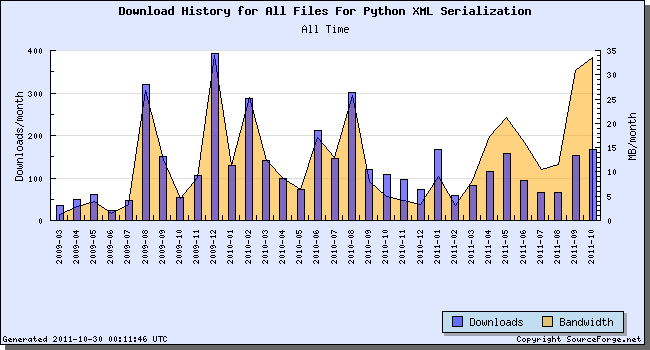
Is a real pleasure to know that it is helping in the development of many applications. Also some other projects like jquery-validators it’s being downloaded over 3.000 times. I think that the best features of pyxser, is the fact it can do circular and cross referenced serialization without crashing. Remember that .NET and Java does not support circular and cross referenced XML serialization, so I have reached the right serialization model with pyxser. I have plans to migrate the serialization model and algorithm to other platform, like Java.
© Daniel Molina Wegener for coder . cl, 2011. |
Permalink |
One comment |
Add to
del.icio.us
Post tags:
Attribution-NonCommercial-ShareAlike 3.0 Unported (CC BY-NC-SA 3.0)
At other side, JSONx is an IBM standard that has as main purpose to build XML representation of JSON objects. It is using a model very similar to the pyxser model, but restricted to JSON supported data types, so it is not extensible like pyxser. It only supports objects, arrays, booleans, strings, numbers, and nulls. The pyxser side is quite simple, it has objects, collections and plain properties. Objects can hold other objects, collections and properties; collections can hold other objects and properties and properties can hold only plain text data types, but flexible enough to create a custom serialization and hold a Base 64 encoded binary string and similar stuff.
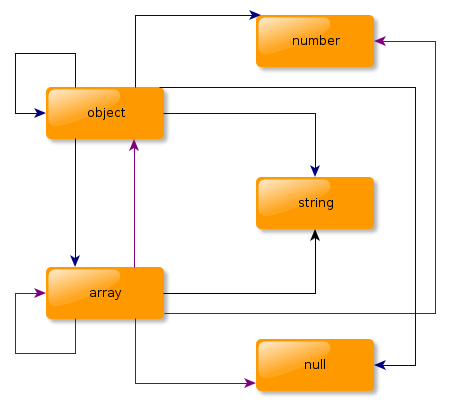
JSONx is more complex than pyxser. It is doing the same mistakes than other serializers, since it holds the data type on the XML element itself. Instead, pyxser is doing the task of placing the data type and namespace on separate attributes. The data type is stored on the type attribute and the namespace is stored on the module attribute. We can talk about JSONx as domain specific XML serialization, at the pyxser side, we can talk as domain abstraction serialization model.
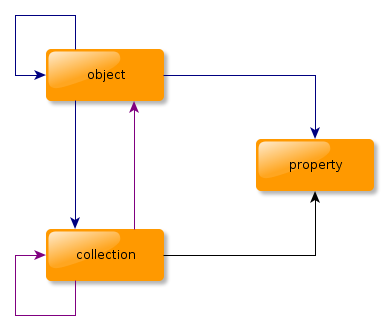
The JSONx model is not available through public XML Schema, its XML Schema is held inside IBM products. You can search for the pyxser XML Schema here, on its public URL: pyxser XML Schema, and the serialization model implementation is available for the Python language as Python Extension (a module written in C) and you can find it here: pyxser. The JSONx reference can be found here: JSONx. Also you can find pyxser XML document definitions in the form of XML schemas and DTD, and it is distributed with the pyxser Python extension:
- pyxser XML Schema.
- pyxser XML Schema, C14N Compatible.
- pyxser XML DTD.
- pyxser XML DTD, C14N Compatible.
Understanding the pyxser XML Schema will drive you to understand its abstraction model. So, have fun implementing domain abstraction, instead of doing domain specific XML serializations.
© Daniel Molina Wegener for coder . cl, 2011. |
Permalink |
No comment |
Add to
del.icio.us
Post tags:
Attribution-NonCommercial-ShareAlike 3.0 Unported (CC BY-NC-SA 3.0)
Some notes on performance. Windows has a very poor performance compared to Linux and FreeBSD platforms. Please check the following plot that compares the performance on Windows, Linux and FreeBSD:

The performance on Windows is very poor. The effort required to migrate the source from POSIX platforms to Windows platforms is minimum. The difference the major effort was made on porting the setup script. My code is almost standard and it requires a C99 compiler, and usually I use the flags -Wall -Wextra -Wshadow -pedantic -std=c99 to compile my sources, so I’m using very strict dialect. Seems that the Windows C compiler is C90 by default. No way to deal with the Windows compiler for some C keywords. I’m expecting to bring constant support for Win32 platform on future releases. I will be waiting your feedback :)
Some notes on the FreeBSD install, is the fact that it is a standard distribution, without kernel optimization and it is using distribution binaries — that means that everything is made for 80×386 machines — and also it does not have any compiler optimization. Also, is well known that FreeBSD default binaries are slow, mainly because it lacks kernel optimization and standard C library optimizations. The libxml2 port on FreeBSD seems to be the problem, since it is not using the jemalloc library, and it is using the internal libxml2 memory allocator.
© Daniel Molina Wegener for coder . cl, 2011. |
Permalink |
One comment |
Add to
del.icio.us
Post tags:
Attribution-NonCommercial-ShareAlike 3.0 Unported (CC BY-NC-SA 3.0)
The ChangeLog for this release is as follows:
1.5.2r (2011.01.08):

        Daniel Molina Wegener

        * Added support for Python 2.4
        * Replaced the use of the commands package by the
        subprocess package on the setup script.
        * On the next release will be added support
        for Python 3.X ;)

        Thanks to pyxser users for their feedback.
type backporting
I’ve received an email from Juha Tuomala reporting incomapibility on pyxser to install it under Python 2.4. Also he has sent me a patch to make it work with Python 2.4. I’ve reviewed the patch and it was including some system macros, so it would be a little bit hard to include in the pyxser distribution. I’ve decided to study the problem about type backporting to make pyxser compatible with Python 2.4. The main problem was the Py_ssize_t, that is not available on Python 2.4, and used from Python 2.5 on the _PyTuple_Resize Python internal. The patch that Juha tried to send me was creating some macros to replace that type definition. But researching a little a about the Py_ssize_t type, I’ve found the PEP353 that guides on how to backport the usage of the Py_ssize_t type.
#if PY_VERSION_HEX < 0x02050000 && !defined(PY_SSIZE_T_MIN)
typedef int Py_ssize_t;
#define PY_SSIZE_T_MAX INT_MAX
#define PY_SSIZE_T_MIN INT_MIN
#endif
The preprocessor conditional block above can be used to backport the Py_ssize_t type without overwriting system types, and since it is a PEP, it should be the official way to backport that specific type. The other problem was about the PyAnySet_CheckExact macro. In this case, I’ve used the that portion of the patch directly, allowing me to backport some pyxser internal functions to Python 2.4
#if PY_VERSION_HEX < 0x02050000 && !defined(PY_SSIZE_T_MIN)
#define Py_TYPE(ob)             (((PyObject*)(ob))->ob_type)
#define PyAnySet_CheckExact(ob)
        (Py_TYPE(ob) == &PySet_Type || Py_TYPE(ob) == &PyFrozenSet_Type)
#endif
I’ve used the same technique to detect the Python version and use that specific macro just for the required Python version. This is not affecting the future versions of Pyxser. For the next pyxser release, I’m planning to port it to Python 3.X. I hope that you will enjoy trasmitting and sending Python objects in XML format using the pyxser serializer ;)
© Daniel Molina Wegener for coder . cl, 2011. |
Permalink |
No comment |
Add to
del.icio.us
Post tags:
Attribution-NonCommercial-ShareAlike 3.0 Unported (CC BY-NC-SA 3.0)
The ChangeLog for this release is as follows:
1.5.1r (2010.10.11):

        Daniel Molina Wegener <[email protected]>

        * On all files: algorithms were optimized, the code
        was flattened applying "The Zen of Python" and the
        performance was enhanced in 10%.

        * Was added the cinit argument to deserialization
        functions, which control whether or not, the default
        constructor is called, instead of creating a raw
        instance of deserialized objects.

        Thanks to pyxser users for their feedback.
The cinit = False argument makes pyxser to skip the default constructor, calling PyInstance_NewRaw() instead of the default constructor. This skips the initialization code on the __init__() method. The impact on the performance — if your objects do not require of the default constructor — is as follows:
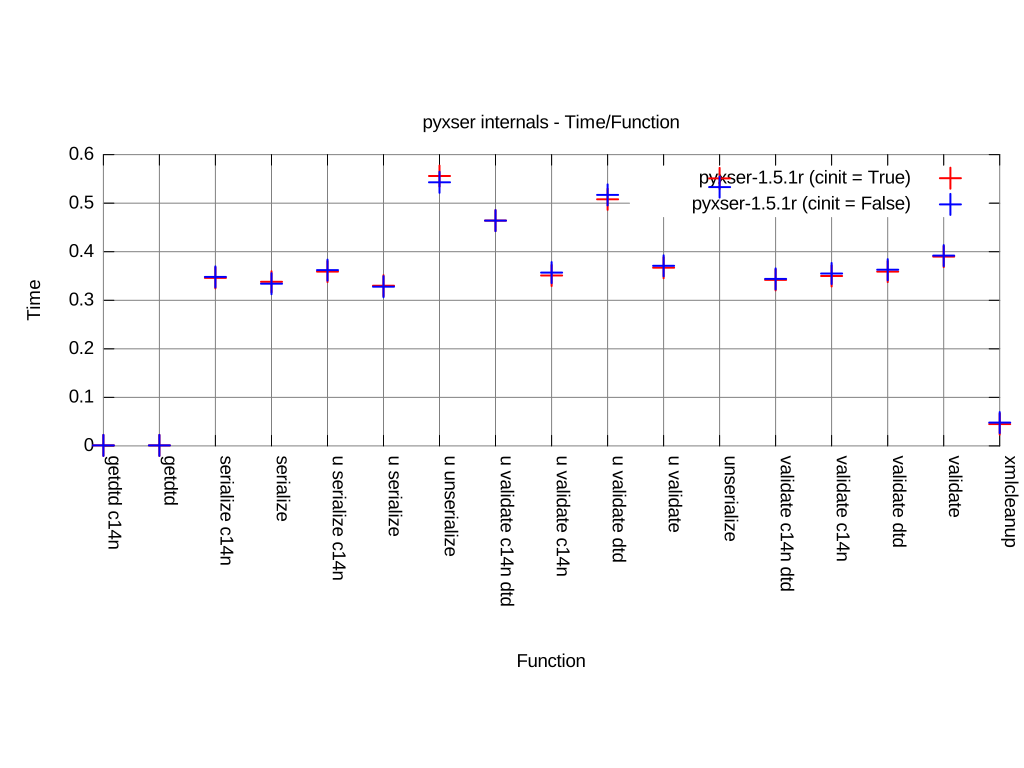
This enhancement is minimal, but saves time when you work with very simple objects. To take a look on the documentation, the pyxser extension is self documented, so you just need to call pydoc -p8181, connect your browser to http://localhost:8181/ and search for the pyxser extension documentation.
I hope that you will enjoy this release :D
© Daniel Molina Wegener for coder . cl, 2010. |
Permalink |
No comment |
Add to
del.icio.us
Post tags:
Attribution-NonCommercial-ShareAlike 3.0 Unported (CC BY-NC-SA 3.0)
This release is quite special, I’ve added lazy initialization of some resources, so it runs 15% faster, and I’ve removed all memory leaks, so it just keeps using about 65MB of RAM when is doing the 1,500,000.00 serialization and deserialization test. I’ve spent more time coding pyxser for this release. Just comparing the performance between the older release 1.4.6r — a buggy release — with the current release 1.5r we can see the performance enhancement as follows:

The memory usage was reduced, on what object creation refers, but not on certain tasks — remember that now I’m using lazy initialization for some resources — and we can see a very similar to previous releases plot on how the memory is handled:

The memoization has suffered some important changes. Now it uses PyObject_Hash() as object identification method. It’s qute slower than past revisions, but still it works faster using lazy initializations. Another important change made to the serialization algorithm, is the fact that now it is skipping callable objects, so function will not be serialized on any manner.
On the distribution now you will find on the test folder directory, some interesting tests, such as utf-16 encoding test and ascii encoding test. All serializations now are using the Python embeded Unicode codecs for deserialization, that is not the case for serialization, it is using the LibXML2 codec, so it can handle more encodings.
I must strongly thank to pyxser users for their feedback.
© Daniel Molina Wegener for coder . cl, 2010. |
Permalink |
No comment |
Add to
del.icio.us
Post tags:
Attribution-NonCommercial-ShareAlike 3.0 Unported (CC BY-NC-SA 3.0)
Let’s take a look on the .NET serialization model. It allows you to create custom XML elements and custom attributes, but does it works with complex objects?. The problem with the .NET serialization model is the fact that it can’t handle cross refereces or circular references, since the serialization model do not consider that kind of object references. If you try to serialize an object with that kind of reference, you will get a pretty exception like this:
Unhandled Exception: System.InvalidOperationException:
There was an error generating the XML document. --->
System.InvalidOperationException: A circular reference was
detected while serializing an object of type TestData.
   at System.Xml.Serialization.XmlSerializationWriter.WriteStartElement(String name,
      String ns, Object o, Boolean writePrefixed, XmlSerializerNamespaces xmlns)
   at Microsoft.Xml.Serialization.GeneratedAssembly.XmlSerializationWriterTestDa
Here is an example of cross referenced object in .NET, so you can verify yourself that you must not use that kind of references on .NET:
using System;
using System.Xml.Serialization;
using System.IO;


[XmlRoot("TestDataXml")]
public class TestData
{
    private int _Identity = 0;
    [XmlElement("Identity")]
    public int Identity
    {
        get { return this._Identity; }
        set { this._Identity = value; }
    }

    private string _Name = "";
    [XmlElement("DataName")]
    public string Name
    {
        get { return this._Name; }
        set { this._Name = value; }
    }

    private string _IgnoreMe = "";
    [XmlIgnore]
    public string IgnoreMe
    {
        get { return this._IgnoreMe; }
        set { this._IgnoreMe = value; }
    }

    private CrossData _CrossReference;
    [XmlElement("CircularReference")]
    public CrossData CrossReference
    {
        get { return this._CrossReference; }
        set { this._CrossReference = value; }
    }

    public TestData()
    {
    }

}

[XmlRoot("TestDataXml")]
public class CrossData
{
    private int _Identity = 0;
    [XmlElement("Identity")]
    public int Identity
    {
        get { return this._Identity; }
        set { this._Identity = value; }
    }

    private string _Name = "";
    [XmlElement("DataName")]
    public string Name
    {
        get { return this._Name; }
        set { this._Name = value; }
    }

    private string _IgnoreMe = "";
    [XmlIgnore]
    public string IgnoreMe
    {
        get { return this._IgnoreMe; }
        set { this._IgnoreMe = value; }
    }

    private TestData _CrossReference;
    [XmlElement("CircularReference")]
    public TestData CrossReference
    {
        get { return this._CrossReference; }
        set { this._CrossReference = value; }
    }

    public CrossData()
    {
    }

}

public class MainTest
{
    public static void Main(string[] args)
    {
        TestData test = new TestData();
        test.Identity = 1;
        test.Name = "Cross Reference 1";
        test.IgnoreMe = "Ignored";
        CrossData cross = new CrossData();
        cross.Identity = 2;
        cross.Name = "Cross Reference 2";
        test.CrossReference = cross;
        cross.CrossReference = test;
        XmlSerializer serializer = new XmlSerializer(test.GetType());
        MemoryStream stream = new MemoryStream(512);
        serializer.Serialize(stream, test);
        Console.WriteLine(stream.ToString());
        stream.Close();
    }
}
And here is an example of circular referenced object in .NET, so you can verify yourself that you must not use that kind of references on .NET:
using System;
using System.Xml.Serialization;
using System.IO;


[XmlRoot("TestDataXml")]
public class TestData
{
    private int _Identity = 0;
    [XmlElement("Identity")]
    public int Identity
    {
        get { return this._Identity; }
        set { this._Identity = value; }
    }

    private string _Name = "";
    [XmlElement("DataName")]
    public string Name
    {
        get { return this._Name; }
        set { this._Name = value; }
    }

    private string _IgnoreMe = "";
    [XmlIgnore]
    public string IgnoreMe
    {
        get { return this._IgnoreMe; }
        set { this._IgnoreMe = value; }
    }

    private TestData _CircularRefence;
    [XmlElement("CircularReference")]
    public TestData CircularReference
    {
        get { return this._CircularRefence; }
        set { this._CircularRefence = value; }
    }

    public TestData()
    {
    }

}

public class MainTest
{
    public static void Main(string[] args)
    {
        TestData test = new TestData();
        test.Identity = 1;
        test.Name = "Circular Reference";
        test.IgnoreMe = "Ignored";
        test.CircularReference = test;
        XmlSerializer serializer = new XmlSerializer(test.GetType());
        MemoryStream stream = new MemoryStream(512);
        serializer.Serialize(stream, test);
        Console.WriteLine(stream.ToString());
        stream.Close();
    }
}
I really can’t stand with all this software quality on what software design refers. What happens in other levels of .NET, is that really safe as they claims?. Do they know about compiler construction techniques and which types of data can be encapsulated on XML. Possibly not… Here you have a simple example with pyxser, which does the both tasks, since the pyxser serialization model allows you to serialize and deserialize that kind of object refereces:
#!/usr/bin/env python
#
#
#

import pyxser
import testmod.testmod as t

class TestData():
    m1 = "hola"
    m2 = "chao"
    m3 = None
    def __init__(self):
        m1 = "chao"
        m2 = "hola"
        m3 = self

class TestCross():
    m1 = "chao"
    m2 = "hola"
    m3 = None
    def __init__(self):
        m1 = "chao"
        m2 = "hola"
        m3 = self


def main():
    x = t.TestData()
    x.m1 = "hola"
    x.m2 = "chao"
    x.m3 = x
    print x
    circular = pyxser.serialize(obj = x, enc = "utf-8", depth = 50)
    print "---8<------ CIRCULAR REFERENCE ----8<---"
    print circular
    y = t.TestCross()
    y.m1 = "chao"
    y.m2 = "hola"
    y.m3 = x
    x.m3 = y
    cross = pyxser.serialize(obj = y, enc = 'utf-8', depth = 50)
    print "---8<------ CROSS REFERENCE ----8<---"
    print cross

if __name__ == "__main__":
    main()
As you will see in the next piece of XML, the first serialization gives me the next result:
<?xml version="1.0" encoding="utf-8"?>
<pyxs:obj xmlns:pyxs="http://projects.coder.cl/pyxser/model/" version="1.0" type="TestData" module="testmod.testmod" objid="id3077395276">
  <pyxs:prop type="str" name="m1">hola</pyxs:prop>
  <pyxs:obj module="testmod.testmod" type="TestData" name="m3" objref="id3077395276"/>
  <pyxs:prop type="str" name="m2">chao</pyxs:prop>
</pyxs:obj>
The second one brings me the next result:
<?xml version="1.0" encoding="utf-8"?>
<pyxs:obj xmlns:pyxs="http://projects.coder.cl/pyxser/model/" version="1.0" type="TestCross" module="testmod.testmod" objid="id3077395180">
  <pyxs:prop type="str" name="m1">chao</pyxs:prop>
  <pyxs:obj module="testmod.testmod" type="TestData" name="m3" objid="id3077395276">
    <pyxs:prop type="str" name="m1">hola</pyxs:prop>
    <pyxs:obj module="testmod.testmod" type="TestCross" name="m3" objref="id3077395180"/>
    <pyxs:prop type="str" name="m2">chao</pyxs:prop>
  </pyxs:obj>
  <pyxs:prop type="str" name="m2">hola</pyxs:prop>
</pyxs:obj>
The solution is done using the proper ID and IDREF attributes on the pyxs:obj element. So you can serialize complex object trees without problems. There is no trick by using those kind of elements, and are present on markup languages from SGML, and anyone with a minimum knowledge about XML knows about them. And this is only one point on a large set of points against .NET that makes me leave the development under that platform. Do not come here with your pretty cool story about how nice is the development under .NET.
© Daniel Molina Wegener for coder . cl, 2010. |
Permalink |
3 comments |
Add to
del.icio.us
Post tags:
Attribution-NonCommercial-ShareAlike 3.0 Unported (CC BY-NC-SA 3.0)
memory profiling
On the profiling script, the only remaining reference to constructed objects. Some interesting notes about the memory profiling task, is that the most allocated object type is str with 278 allocations, and is using the 47% with 10384 bytes, but the heaviest object is dictionary with 79 allocations, the 13% and 457720 bytes. I’ve tested pyxser using valgrind without any kind of true report of memory leaks.

Also, in the pyxser distribution, you can find the test-utf8-leak.py script, which executes serialization and deserialization functions up to 1000000 times, leaving python executable just using a small portion of the operating system memory, and certainly you will notice that pyxser maintains its memory usage along that test.
speed tests
Speed tests are going fine, I’ve reduced a small amount of the used by the serialized and created a new test that executes each pyxser function 1000 times. The result can be seen as follows:

Deserialization functions are the slowest ones, requiring almost the double time that serialization takes, but thinking a little, you will notice that the XML parsing process is slower than Python object tree traversal. Some functions, like getdtd() and getdtdc14n() practically do not require time to being executed, since both DTDs are pre-allocated on module loading, the same applies to pyxser XML schemas. I think that I will reduce the execution and load time along the time, since pyxser has reached a good maturity level, without memory leaks and well structured tests, for different kinds of objects — as any lazy resource initialization.
© Daniel Molina Wegener for coder . cl, 2010. |
Permalink |
No comment |
Add to
del.icio.us
Post tags:
Attribution-NonCommercial-ShareAlike 3.0 Unported (CC BY-NC-SA 3.0)
metrics
pyxser is complex. It requires some compiler construction techniques. The main one is memoization, which uses an internal and thread safe cache to allow the serializer to create unique XML instances of the pyxs:obj element. Also, it uses mutually recursive functions while is harvesting objects from the object tree using an preorder traversal tree algorithm. The result of implementing it, is the following table:
| metric | overall | per module |
|---|---|---|
| number of modules | 1 | — |
| lines of code | 5343 | 5343 |
| mccabe’s cyclomatic number | 1025 | 1025 |
| loc/com | 10.024 | — |
| mvg/com | 1.923 | — |
But there is a fact, pyxser is fast as hell!. It can do 10010 serializations in 1.992 seconds and 11011 deserializations in 6.910 seconds. So, I was introducing some enhancements and securing the code doing code harndening test and shorting code flow paths. Now the code looks flat and more elegant.
profiling
After securing the code I got a slower pyxser implementation. So, I was impressed since I got to double the time on certain internal functions. Here is the metric on how code was executed:

But after some code cleanup, refactoring and code path shortening, I got much better results, and I’ve maintained the original perfomance with hardened, ordered and flat code. The reduction of nested statements was quite hard, but I’ve done it. It has just three levels as an average of nested statements:

enhancements
pyxser now can serialize, for example SqlAlchemy objects, sent them through the network and restore the instance so far away. For those kind of objects you must follow a simple rule, use the selector argument and the depth argument. The pyxser distribution comes with some test files, test-utf8-sqlalchemy.py is one of those files, where we define a class User:
class User(Base):
    __tablename__ = 'users'
    id = Column(Integer, primary_key=True)
    name = Column(String)
    fullname = Column(String)
    password = Column(String)

    def __init__(self):
        self.name = None
        self.fullname = None
        self.password = None

    def get_set(self):
        return (self.name, self.fullname, self.password)

    def __repr__(self):
        return "User('%s','%s', '%s')" % self.get_set()
The first rule is quite simple: the constructor must be a simple constructor, without arguments, but it can hold initialization code, just remain it without arguments. And the second rule is to use the selector argument:
def sqlalch_filter(v):
    r = ((not callable(v[1]))
         and (not (v[0].startswith("_")))
         and ((v[0] != "metadata")))
    return r

def sqlalch_selector(o):
    r = dict(filter(sqlalch_filter, inspect.getmembers(o)))
    return r

serialized = pyxser.serialize(obj = ed_user, enc = 'utf-8', selector = sqlalch_selector, depth = 2)
This will create a very simple object:
<?xml version="1.0" encoding="utf-8"?>
<pyxs:obj xmlns:pyxs="http://projects.coder.cl/pyxser/model/" version="1.0" type="User" module="testpkg.sample" objid="id170543564">
  <pyxs:prop type="str" name="fullname">Ed Jones</pyxs:prop>
  <pyxs:prop type="str" name="password">password</pyxs:prop>
  <pyxs:prop type="str" name="name">ed</pyxs:prop>
</pyxs:obj>
But when it is restored on the end, it will remain intact.
Some people was saying that pyxser do not comes with documentation. Those people have not seen the documentation. pyxser as any Python extension, is self documented, this means that you must launch pydoc to read it. If you never have used pydoc, just try it: pydoc -p8080, this will create a small web server running on localhost to let you read the documentation. It has some other interesting parameters, others than depth and selector, such as typemap, which allows you to create custom serializations of certain objects — such as files.
where is located
The project is hosted at SourceForge: pyxser@sourceforge and the home page of the project is located [email protected].
© Daniel Molina Wegener for coder . cl, 2010. |
Permalink |
No comment |
Add to
del.icio.us
Post tags:
Attribution-NonCommercial-ShareAlike 3.0 Unported (CC BY-NC-SA 3.0)